Stop pressing F5
Reloadwright refreshes any tab on a timer, free and without limits. With Pro it watches the page for you: the moment your text shows up or a part of the page changes, it tells you, on your computer and on your phone.
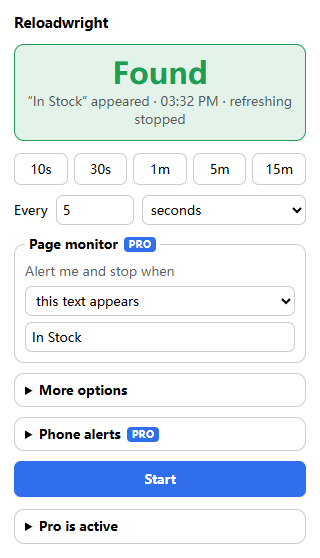
What it does
Refresh on a timer
Pick 10 seconds to 24 hours with one click, or type your own. Any number of tabs, each with its own timer and a live countdown on the toolbar icon.
Refresh your way
Add a random delay, refresh only during the hours you choose, bypass the cache, or stop by itself after a set number of refreshes. Your last interval is remembered for each site.
Watch for textPRO
Type what you are waiting for, such as “In stock”. When it appears, or disappears, refreshing stops and you get a desktop notification and a sound.
Watch any part of the pagePRO
Not sure what the page will say? Click the part you care about, such as a price or a status, and get told as soon as it changes, with the old and new text.
Alerts on your phonePRO
Away from your desk? Send the alert to your phone through Bark, ntfy, a Telegram bot, a WeCom group robot, ServerChan or your own address.
Click for youPRO
Pick a button or link and Reloadwright presses it after every refresh, or only when the page monitor finds something.
Phone alerts: step-by-step setup guide →
Simple pricing
Free
- Timed refresh, 5 seconds to 24 hours
- Any number of tabs
- Live countdown and refresh counter
- Random delay and daily time window
- Hard refresh (bypass cache)
- Stop after a set number of refreshes
Pro
- Everything in Free
- Watch for text appearing or disappearing
- Watch any part of the page for changes
- Desktop notification and sound
- Alerts on your phone
- Automatic click
Questions
Do I need an account?
No. Reloadwright works as soon as it is installed.
Is the free version limited?
Not for refreshing. Every refresh feature is free, on as many tabs as you like. Pro adds the page monitor, alerts and automatic clicks.
Does it keep refreshing when the tab is in the background?
Yes. The timer runs in the extension, not in the page, so the tab does not need to be in front.
What can it read on my pages?
Nothing, unless you turn on a page monitor or an automatic click for a site. Then Edge asks you to allow access to that one site, and the page is checked on your computer. Page content is not sent anywhere, except the short alert you choose to send to your own phone.
How do phone alerts work?
You pick a push service you already use and paste its key or address. When a monitor finds something, Reloadwright sends the alert straight from your browser to that service. It does not pass through our servers.
How does Pro work?
Buy once and your license key arrives by email. Open the popup, expand “Get Reloadwright Pro” and paste it in. No subscription.
How many computers can I use?
One key works on up to 3 browsers at a time. Use “Deactivate” in the popup to move it.
What if it is not for me?
Email [email protected] within 14 days of purchase for a full refund.